theres superadministrator in an ownership administration that can create and publish routines down to subunits.
Get into the appropriate routine.
Press on cogwheel and choose Edit.
Publishing
Sharing with subunits
When you are going to publish a routine, you have the following options for sharing to subunits:
Do not share to subunits — the routine remains with the owner administration only.
To all subunits — the routine is published to all subunits.
To selected subunits — the routine is published to selected subunits.
Permissions for subunits
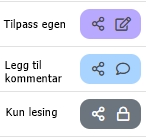
When you share a routine, specify which permissions the subunits should have:
Reading only — the subunit can only read the routine, no changes or additions possible.
Add Comment -- the subunit can add local text to a separate comment box, but cannot change the routine itself.
Customize your own — the subunit can adapt the routine to its own needs.
Note: In the selection of Customize your own is it subject to restrictions from the owner administration. The permission cannot be made more stringent, and selected subunits cannot be removed retrospectively.
Change type and notification
Before publishing, you need to decide on the field Change type:
New version — used for new routines or changes in content.
New version — notification — used if managers are also to be notified of the change.
Then you get an additional option to send an email notification or get a notification in Mentor HSE. Squat off for who should receive the notification.
Comment on publication
Decide who and how updates should be notified to the subunits. We always recommend writing a short comment so that the subunits understand why the routine has been created or changed.
Storage
When you're done:
Press the blue button Publish.
The routine will then become available in The HSE Manual to the appropriate units.