

Mentor HMS can be configured with multiple levels, allowing you to manage content and HSE work across your entire organization. The organizational structure is set up by PBL Mentor. Please contact us if you would like to create divisions or make changes to your existing organizational structure.
Group → Division → Sub-unit
The group is the top level, divisions group together multiple sub-units, and sub-units are the local businesses or departments.
The organizational structure makes it possible to manage content at different levels. Content from the group level can be shared with divisions and sub-units, while a division can share content with its sub-units. Sub-units can also have their own local content.
This allows you to combine common guidelines for the organization with local needs.
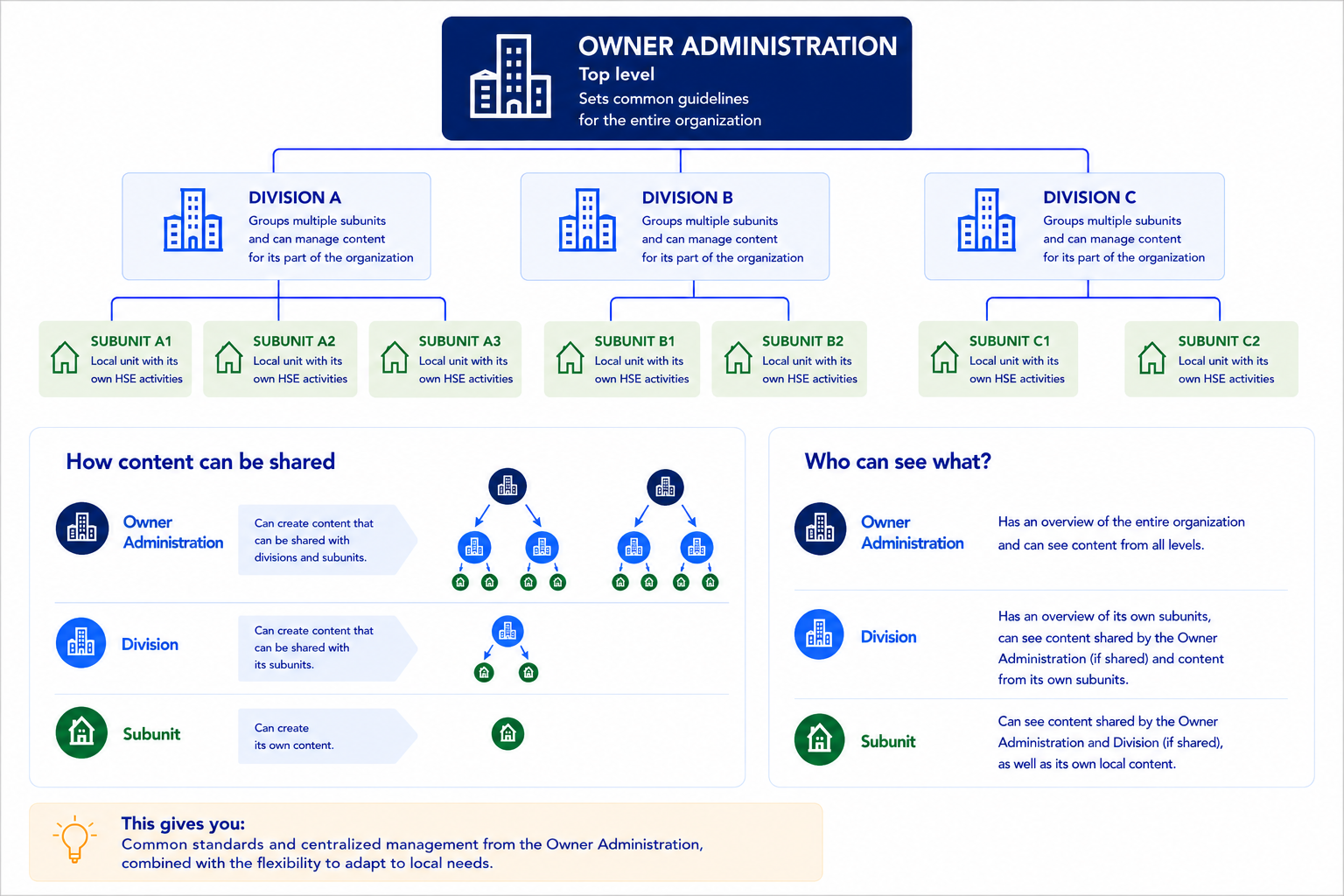
Content created at a higher level can be distributed to the levels below. From the group level, content can be shared with divisions and sub-units, while content from a division can be shared with the sub-units belonging to that division.
When publishing, you decide how far down in the organization the content should be shared. Depending on the feature, you may also have options regarding which units the content should be shared with, what permissions the recipients should have, and whether recipients should be notified of new or updated content.
Content that is not shared further remains at the level where it was created.
The options available during publishing may vary between routines, checklists, annual cycles, and other features. Please refer to the support article for the specific feature for a detailed description of how content is published and managed.
At the group and division levels, you can monitor HSE work across the units you have access to.
Under Reports – Status subunits you get a comprehensive overview of logins, completed checklists, non-conformities, risk assessments, and implemented measures, among other things. You can narrow the overview down to a specific period, search and filter by unit, and export the results to Excel.
For more detailed insights, you can use the other reports in Mentor HMS. Here, you can take a closer look at non-conformities, improvement suggestions, checklists, and risk assessments to see what lies behind the figures in Sub-unit status.

